How to Change Your Nonprofit Information Through the USPS
Step-by-step guide to updating your nonprofit organization's information with USPS Form 6015.
Dealing with the United States Postal Service can be difficult and inconsistent. That's why we've created these guides to help you apply for nonprofit mailing privileges or update your information. Keep in mind that USPS may require additional documents, and we'll update the guides as needed.
This guide is for those with existing USPS mailing privileges who need to make changes. Changing your nonprofit information can be done through the USPS Business Gateway or at your local post office. Click here to access the digital Form 6015.
Option 1: Using USPS Business Gateway
- Log in to your Business Customer Gateway Account.
-
Once you have entered your account, you will find a menu on the left side. Select Mailing Services.

-
Scroll through the list of services and locate Postal Wizard (PostalOne!) and click "Go to Service".

-
Once you're in Postal Wizard, scroll down and look for "Complete Customer Service Form" and find "Form 6015 - Nonprofit Database Change Request".

-
Upon clicking Form 6015, you should see an existing authorization number listed. Click the number you want to update to proceed.

Note: You must have an existing 3624 Application in order to fill out this form. Don't have nonprofit mailing privileges? Learn how to apply.
-
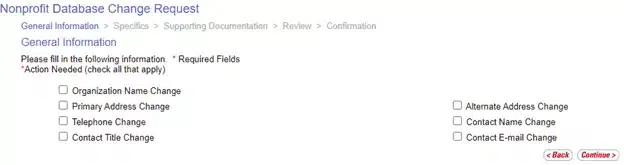
On the General Information page, check the boxes for the specific changes you would like to make, then click Continue.
-
The Specifics page is where you enter your new information for the request. Make sure the new information is accurate and that you complete all the required fields marked with red asterisks.
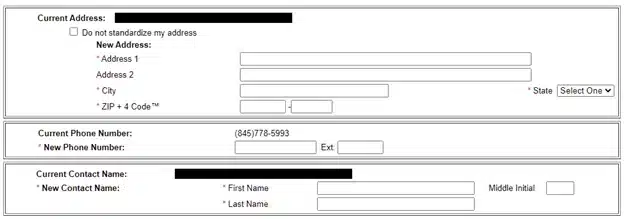
Note: If your address should not be standardized (converted to standard USPS format), check the box "Do not standardize my address."
- The final step is the Review page, where you can check all the changes you're requesting. Carefully review everything to ensure your information is accurate. Double-check everything before submitting.
- Click "Standardized" for a definition and, if it applies, update your request accordingly. If you need to correct anything, use the "Edit Updated Information" option.
- Once you're confident everything is correct, click "Submit".
Option 2: Using a Physical Form 6015
- Ask for a Form 6015 from your local Post Office, or download the digital version here.
-
Tick the boxes for the information changes you want to make.
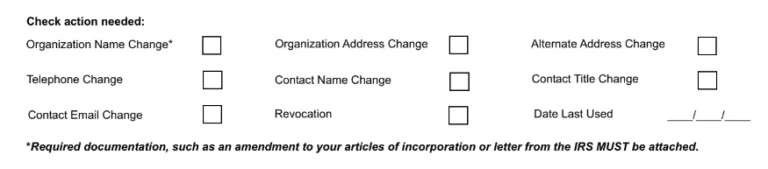
Note: Changes to the organization's authorized name require additional supporting documentation that must be submitted to the PCSC or MSSC.
-
Fill out your old information. If you only need to update the Contact Name, you only need to complete that specific field.
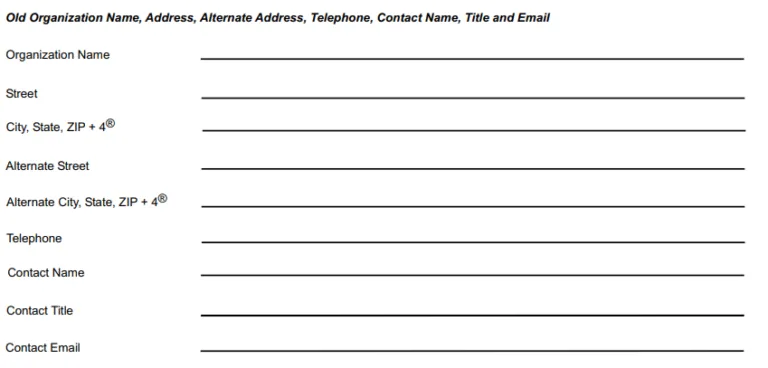
- Write down your new information. For example, if you only changed your Contact Name, you only need to update that specific field.
- Submit the form to your local Post Office.
Cornerstone Can Handle This for You
If you're a Cornerstone Services client, we can handle the entire Form 6015 process for you — from verifying your authorization numbers to submitting the changes. Planning a nonprofit event? See our complete friendraising guide.
Important Notes
- Changes to general information such as mailing address or phone number will take place immediately.
- Changes to the organization's authorized name require additional supporting documentation that must be submitted to the PCSC. You are required to attach documents such as amendments to your articles of incorporation or a letter from the IRS.
Frequently Asked Questions
What is USPS Form 6015?
Form 6015 is the Nonprofit Database Change Request form used to update your organization's information with the USPS. This includes changes to your organization name, address, contact person, or authorization details. You can submit it through the USPS Business Gateway online or at your local post office.
Do I need existing nonprofit mailing privileges to use Form 6015?
Yes. Form 6015 is for organizations that already have USPS nonprofit mailing authorization (via Form 3624). If you don't yet have nonprofit mailing privileges, you need to apply first. Cornerstone can help with both the initial application and subsequent changes.
Can Cornerstone help with nonprofit mailing paperwork?
Yes. We've helped dozens of nonprofit organizations in the Hudson Valley apply for and maintain their USPS mailing privileges. We can walk you through the Form 6015 process, verify your authorization numbers, and handle the entire mailing once your records are updated. Call us at (845) 255-5722.

Ready to Start Your Next Mailing?
Get a free estimate from Hudson Valley's most trusted direct mail team. 2.3M+ pieces mailed and counting.